Designing PIC-X: Deriving an Initial PIC Context of Authority
This article defines the initial continuity exchange flow of PIC-X. It explains how PIC-X validates an OAuth access token and the initial Continuity Proposal in the selected realm, derives the initial PIC Context of Authority (PCA), issues the initial PIC PCA COSE and PIC Continuity COSE, and returns the first PIC Token JWT. The article describes authority propagation, execution-contract enforcement, authority non-expansion, and the complete lifecycle of the initial exchange. The internal COSE artifact structures are intentionally deferred to a dedicated protocol article.
- tags
- #Pic #Pic-X #Authority Continuity #Oauth #Token Exchange #Exchange Profile #Configuration #Security #Authorization #Software Engineering #Design
- published
- reading time
- 14 minutes
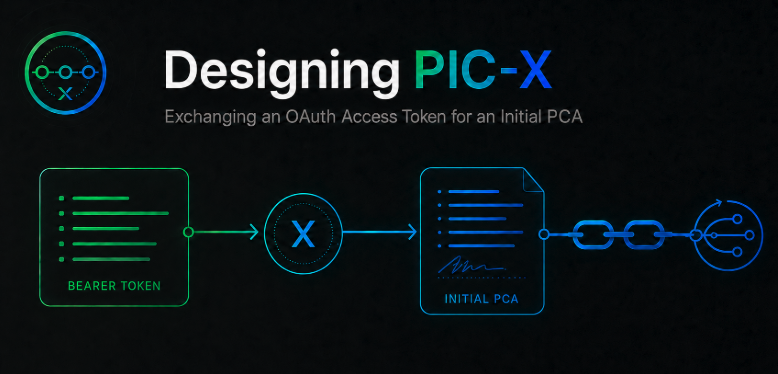
PIC-X receives an OAuth access token at the selected realm token endpoint, validates it, and derives the initial PIC Context of Authority, or PCA. A PCA is the logical Context of Authority. Its signed representation is a PIC PCA COSE. PIC-X then returns a realm-signed PIC Token JWT carrying a settled PIC Continuity COSE in pic.root.
The realm is selected by the endpoint path, for example POST /realms/acme/token; no separate realm form parameter is introduced.
OAuth access token
        |
        v
picX.exchange(accessToken, continuityProposal)
        |
        v
PIC PCA COSE 0
signed PIC Context of Authority
        |
        v
PIC Continuity COSE 0
settled, transitions = null
        |
        v
PIC Token JWT 0
external transport envelope
        |
        +-- application PDP evaluation over the effective PIC authority context
The application developer is not expected to implement these protocol mechanics by hand. PIC libraries, SDKs, runtimes, or infrastructure components provide the applicable construction, selection, exchange, and verification operations, while PIC-X performs the server-side authority derivation, validation, and realm-scoped signing required by the selected flow.
Info: The exchange can also be performed by an API gateway, service mesh, or another infrastructure component. In that model, PIC-X remains transparent to the application: the application receives the PIC Token JWT without implementing the exchange flow.
Warning: The following example uses an application PDP through AuthZEN . AuthZEN is an OpenID Foundation authorization interoperability specification that defines a standard API between a Policy Enforcement Point (PEP) and a Policy Decision Point (PDP). It must not be confused with PIC Trusted Anchors such as Guardrail. Trusted Anchors are protocol-level trust policy engines: they evaluate granted scopes, verify PIC Token JWT and PIC COSE artifact signatures, and enforce non-repudiation and other PIC trust rules. They are part of the PIC protocol flow, not the application authorization flow shown here.
The remaining sections explain how PIC-X performs the first exchange.
The exchange operation will be exposed through a PIC-specific OAuth Token Exchange Profile. Initialization uses a self-describing continuity_proposal input. Current Profile 0.2 PIC-to-PIC advancement carries the workload-signed candidate PIC Token JWT as the standard RFC 8693 subject_token and omits continuity_proposal; future profiles may define additional self-describing Continuity Proposal types with their own definition URIs and schemas.
The Initial Continuity Proposal is used before PIC continuity exists. It carries a type member whose value identifies the proposal definition/schema and determines how the remaining proposal payload is interpreted and validated. Current Profile 0.2 defines https://pic-protocol.org/definitions/proposal-types/continuity-initial for this purpose.
The value of continuity_proposal is produced by serializing the proposal object as compact UTF-8 JSON and applying unpadded Base64url encoding. The proposal object is not a JWT or COSE artifact, and the exact schemas for any future proposal types are outside the scope of this article.
PCA and PIC Token
A PCA is the logical PIC Context of Authority.
Its signed representation is a PIC PCA COSE.
This article uses decoded and conceptual views to explain the flow. The dedicated token/artifact article defines the serialization. In PIC Profile 0.2, the external envelope is a PIC Token JWT and the internal PIC artifacts are native CBOR/COSE.
PCA
→ logical PIC Context of Authority

PIC PCA COSE
→ signed trusted authority checkpoint representation
→ format: pic-pca+cose
→ contains position
→ contains context_of_authority
→ carries challenge.next_challenge
A PIC Token JWT is the external PIC envelope. In the initialization flow, PIC-X returns a realm-signed settled PIC Token JWT whose pic.root value carries the current PIC Continuity COSE. During later advancement, a workload-produced candidate PIC Token JWT carries a candidate Continuity and exactly one Transition for PIC-X validation; that flow is defined in the token/artifact article.
PIC Token JWT
→ format: pic+jwt
→ carries `pic.root` as PIC Continuity COSE
→ may carry future `pic.compositions[]` PIC Continuity COSE values

PIC Continuity COSE
→ format: pic-continuity+cose
→ signed continuity container
→ carries exact signed PIC PCA COSE bytes for the current trusted checkpoint
→ uses transitions = null when settled
For initialization, PIC-X operates in the selected realm context to create the initial PIC PCA COSE and PIC Continuity COSE, then returns the initial PIC Token JWT:
PIC PCA COSE 0
├── protected COSE header
├── position = 0
├── context_of_authority
└── challenge
    → next_challenge initializes the first transition

PIC Continuity COSE 0
├── root.pca = exact signed PIC PCA COSE 0 bytes
└── transitions = null

PIC Token JWT 0
└── carries PIC Continuity COSE 0 in `pic.root`
The internal COSE structures are intentionally deferred to a dedicated protocol article.
1. Incoming OAuth Access Token
This example uses a signed JWT access token.
{
  "header": {
    "alg": "ES256",
    "kid": "idp-key-1",
    "typ": "at+jwt"
  },
  "payload": {
    "iss": "https://idp.example.com",
    "sub": "user-123",
    "aud": "pic-x",
    "iat": 1785589400,
    "exp": 1785590000,

    "name": "Oliver Bennett",
    "email": "oliver.bennett@example.com",
    "tenant_id": "tenant-a",

    "roles": [
      "document-manager"
    ],

    "groups": [
      "document-management",
      "eu-employees"
    ],

    "scope": "documents:read documents:write documents:read:document-42"
  }
}
PIC-X validates the token before using any claim.
2. Exchange Profile
When PIC-X starts, it loads one or more Exchange Profiles. Each profile defines how tokens from a specific identity provider are validated and mapped into PIC authority. Multiple profiles may therefore coexist, allowing PIC-X to integrate with different IdPs while exposing a single PIC-X exchange interface.
An Exchange Profile defines how the scopes issued by its identity provider are converted into PIC privileges.
In this simple example, two scope formats are supported:
<resource-type>:<operation>
<resource-type>:<operation>:<resource-id>
For example:
documents:read
documents:write
documents:read:document-42
Below is an example Exchange Profile for a specific identity provider:
exchangeProfile:
  id: corporate-oauth-to-pic

  source:
    tokenType: oauth-access-token
    format: jwt
    issuer: https://idp.example.com
    audience: pic-x

    validation:
      allowedAlgorithms:
        - ES256
      requireExpiration: true
      requireTokenType: at+jwt

  claims:
    identity_context:
      type:
        value: user

      id:
        from: sub

      roles:
        from: roles
        type: set

      groups:
        from: groups
        type: set

      securityDomain:
        from: tenant_id

    scopes:
      from: scope
      encoding: space-delimited
      type: set

  privileges:
    source: scopes

    rules:
      - name: resource-instance
        priority: 10
        pattern: '^(?<resourceType>[a-z][a-z0-9_-]*):(?<operation>[a-z][a-z0-9_-]*):(?<resourceId>[a-zA-Z0-9_-]+)$'

        emit:
          scope: '${raw}'
          operation: '${operation}'
          resourceType: '${resourceType}'
          resourceId: '${resourceId}'

      - name: resource-collection
        priority: 1
        pattern: '^(?<resourceType>[a-z][a-z0-9_-]*):(?<operation>[a-z][a-z0-9_-]*)$'

        emit:
          scope: '${raw}'
          operation: '${operation}'
          resourceType: '${resourceType}'
          resourceId: '*'

  onUnmatchedScope: reject
raw is the original scope string matched by the rule.
Rules are evaluated from priority 10 to priority 1.
10 = highest priority
1  = lowest priority
A more specific rule must have a higher priority than a generic rule. Otherwise, the collection rule could consume a resource-specific scope before the instance rule evaluates it.
documents:read:document-42
For this reason:
resource-instance   → priority 10
resource-collection → priority 1
Rules with the same priority are evaluated in an unspecified order. Profiles should therefore avoid equal priorities when rules can match overlapping inputs.
raw = documents:write
The Exchange Profile validates and maps the access token. The execution contract is supplied by the caller inside the initial Continuity Proposal, not by the Exchange Profile.
3. Mapped Exchange Result
For the sample token, the Exchange Profile produces the following mapped result:
{
  "identity_context": {
    "type": "user",
    "id": "user-123",
    "roles": [
      "document-manager"
    ],
    "groups": [
      "document-management",
      "eu-employees"
    ],
    "securityDomain": "tenant-a"
  },

  "privileges": [
    {
      "scope": "documents:read",
      "operation": "read",
      "resourceType": "documents",
      "resourceId": "*"
    },
    {
      "scope": "documents:write",
      "operation": "write",
      "resourceType": "documents",
      "resourceId": "*"
    },
    {
      "scope": "documents:read:document-42",
      "operation": "read",
      "resourceType": "documents",
      "resourceId": "document-42"
    }
  ]
}
Note: The mapped
identity_contextis optional. When no identity context is produced, the resulting PCA may contain onlyexecution. Identity-context fields are descriptive and do not grant authority; authority is produced from execution invariants.
Each privilege maps to one atomic execution-invariant authority item:
privilege = (scope, operation, resourceType, resourceId)
4. Initial PCA (PIC Context of Authority)
Below is an example of the context_of_authority value for PCA 0. A PCA is the logical Context of Authority. Its signed representation is a PIC PCA COSE:
{
  "identity_context": {
    "type": "user",
    "id": "user-123",
    "roles": [
      "document-manager"
    ],
    "groups": [
      "document-management",
      "eu-employees"
    ],
    "securityDomain": "tenant-a"
  },

  "execution": {
    "invariants": [
      {
        "scope": "documents:read",
        "operation": "read",
        "resourceType": "documents",
        "resourceId": "*"
      },
      {
        "scope": "documents:write",
        "operation": "write",
        "resourceType": "documents",
        "resourceId": "*"
      },
      {
        "scope": "documents:read:document-42",
        "operation": "read",
        "resourceType": "documents",
        "resourceId": "document-42"
      }
    ],

    "contract": {
      "corporation": "acme",
      "departments": [
        "engineering",
        "operations"
      ]
    }
  }
}
The JSON shown above is the logical application-facing Context of Authority. When the PCA is serialized into a PIC PCA COSE, the logical context is deterministically denormalized and ordered into a Canonical Authority Map. PIC Profile 0.2 represents that canonical form as a compact tuple-based Indexed Authority Map so that authority can be deterministically canonicalized, identity_context and execution.invariants can use removal attenuation by section-local numeric index, and the result can be transported compactly. In that flattened canonical representation, logical execution.contract maps to execution_contract. The normalized logical example is not embedded directly in the PIC PCA COSE.
Warning:
identity_contextis optional. It may be omitted when the Exchange Profile does not produce it. The field describes identity or context; it does not grant authority.
Protocol metadata such as profile, issuer identity, and issuance metadata belong to the signed PIC Token JWT and PIC COSE artifacts, not to the logical context alone.
After constructing PCA 0, PIC-X creates the initial realm-signed PIC PCA COSE:
PIC PCA COSE 0
├── protected COSE header
├── position = 0
├── context_of_authority: Indexed Authority Map derived from PCA 0
└── challenge
    → next_challenge initializes the first transition
The realm-signed PIC PCA COSE is the signed representation of the initial authority checkpoint and carries challenge.next_challenge for the first transition.
PIC-X then creates the initial realm-signed PIC Continuity COSE, wraps it as pic.root in the realm-signed PIC Token JWT, and returns that PIC Token JWT.
PIC Continuity COSE protected header
→ identifies the signing algorithm and key

PIC Continuity COSE payload
→ root.pca = exact signed PIC PCA COSE 0 bytes
→ transitions = null

PIC Token JWT payload
→ carries the PIC Continuity COSE in `pic.root`
Conceptually:
PCA 0
→ logical Context of Authority

PIC PCA COSE 0
→ signed checkpoint representation of PCA 0
→ position = 0
→ carries challenge.next_challenge

PIC Continuity COSE 0
→ root.pca = exact signed PIC PCA COSE 0 bytes
→ transitions = null

PIC Token JWT 0
→ carries PIC Continuity COSE 0 in `pic.root`
→ returned by PIC-X
The internal COSE structures are intentionally deferred to a dedicated protocol article.
A Continuity Proposal is structured input used when continuity is initialized or when a future centralized advancement profile needs support material. The proposal object is self-describing: its type member identifies the applicable proposal definition/schema, required and optional payload members, and validation rules. Current Profile 0.2 defines only the Initial Continuity Proposal type:
https://pic-protocol.org/definitions/proposal-types/continuity-initial
In this article, the Initial Continuity Proposal contains the execution contract and is used before PIC continuity exists. Current Profile 0.2 PIC-to-PIC advancement omits continuity_proposal; future profiles may define additional self-describing Continuity Proposal types when a concrete schema exists.
execution.invariants carries the authority that must be preserved or attenuated across continuity.execution.contract carries execution-specific constraints.
5. Providing the Initial Continuity Proposal
The initialization exchange uses a self-describing continuity_proposal. Its JSON object carries:
type = https://pic-protocol.org/definitions/proposal-types/continuity-initial
That definition URI identifies the Initial Continuity Proposal schema and validation semantics. The Initial Continuity Proposal contains the execution contract and may contain additional initialization material defined by its proposal type and permitted by the selected PIC profile.
picToken0 = picX.exchange(
    accessToken,
    continuityProposal
)
For the flow described here, the proposal contains only the execution contract. It is provided by the caller, not by the Exchange Profile.
Example Initial Continuity Proposal before Base64url encoding:
{
  "type": "https://pic-protocol.org/definitions/proposal-types/continuity-initial",
  "executionContract": {
    "corporation": "acme",
    "departments": [
      "engineering",
      "operations"
    ]
  }
}
PIC-X extracts the validated executionContract from the initial Continuity Proposal and places it in the logical PCA before serialization.
When the PCA is serialized into the PIC PCA COSE, the logical Context of Authority is transformed into the Profile 0.2 Indexed Authority Map defined by the token/artifact article. The logical execution.contract value becomes the canonical execution_contract section. Entries use compact tuples with explicit section-local numeric indexes assigned after deterministic denormalization and sorting; JSON object member order is not the index.
The logical input remains normalized:
{
  "execution": {
    "contract": {
      "corporation": "acme",
      "departments": [
        "engineering",
        "operations"
      ]
    }
  }
}
The contract must contain at least one attribute with a non-empty value.
Each attribute supports only one of these value types:
non-empty string
non-empty array of non-empty strings
Valid examples:
{
  "corporation": "acme"
}
{
  "departments": [
    "engineering",
    "operations"
  ]
}
{
  "corporation": "acme",
  "regions": [
    "eu-west-1",
    "eu-central-1"
  ]
}
Invalid examples:
{}
{
  "corporation": ""
}
{
  "departments": []
}
{
  "retryCount": 3,
  "enabled": true,
  "limits": {
    "cpu": "2"
  }
}
Numbers, booleans, objects, null values, empty strings, empty arrays, and arrays containing empty or non-string values are not supported.
Warning:
execution.contractdoes not grant authority and does not replaceexecution.invariants. It adds execution constraints to the authority carried byexecution.invariants.
During continuity advancement, later contract restrictions may only add constraints combined with logical AND. They do not remove or weaken constraints established by the predecessor PCA checkpoint.
6. Selecting Authority by Scope
The application declares the scope required for the operation:
requiredScope = "documents:write"
A developer might use code as simple as the following:
identityContext = selectIdentityContext(effectiveAuthorityContext)

invariant = selectInvariantByScope(
    effectiveAuthorityContext,
    "documents:write"
)
Selected identity context:
{
  "type": "user",
  "id": "user-123",
  "roles": [
    "document-manager"
  ],
  "groups": [
    "document-management",
    "eu-employees"
  ],
  "securityDomain": "tenant-a"
}
Selected invariant:
{
  "scope": "documents:write",
  "operation": "write",
  "resourceType": "documents",
  "resourceId": "*"
}
The AuthZEN request values are derived from the selected authority-context values:
subject  = toAuthZenSubject(identityContext)
action   = selectOperation(invariant)
resource = selectResource(invariant)
Derived action:
{
  "name": "write"
}
Derived resource:
{
  "type": "documents",
  "id": "*"
}
7. Mapping a PCA to AuthZEN
AuthZEN is an OpenID Foundation specification for authorization interoperability. It standardizes how a Policy Enforcement Point asks a Policy Decision Point for an authorization decision, without requiring either component to know the other’s internal policy language or implementation.
In this article, PIC supplies the current authority context, while AuthZEN is used only as the application-facing request and response interface to the PDP.
Once the authority has selected the invariant, the application can invoke the PDP interface:
identityContext = selectIdentityContext(effectiveAuthorityContext)

invariant = selectInvariantByScope(
    effectiveAuthorityContext,
    "documents:write"
)

subject = toAuthZenSubject(identityContext)
action = selectOperation(invariant)
resource = selectResource(invariant)

decision = pdp.authzen.evaluate(
    subject,
    action,
    resource,
    {
        scope: invariant.scope,
        securityDomain: identityContext.securityDomain
    }
)
Here is a sample AuthZEN authorization request:
POST /access/v1/evaluation HTTP/1.1
Host: pdp.example.com
Authorization: Bearer <pdp-client-token>
Content-Type: application/json
X-Request-ID: bfe9eb29-ab87-4ca3-be83-a1d5d8305716
{
  "subject": {
    "type": "user",
    "id": "user-123",
    "properties": {
      "roles": [
        "document-manager"
      ],
      "groups": [
        "document-management",
        "eu-employees"
      ]
    }
  },

  "resource": {
    "type": "documents",
    "id": "*",
    "properties": {
      "securityDomain": "tenant-a"
    }
  },

  "action": {
    "name": "write"
  },

  "context": {
    "scope": "documents:write",
    "securityDomain": "tenant-a"
  }
}
Info: PIC does not depend on AuthZEN . AuthZEN is used here only as one possible standardized interface between the application Policy Enforcement Point and its Policy Decision Point.
The mapping is direct:
identity_context.type           → subject.type
identity_context.id             → subject.id
identity_context.roles          → subject.properties.roles
identity_context.groups         → subject.properties.groups
identity_context.securityDomain → context.securityDomain
invariant.operation             → action.name
invariant.resourceType          → resource.type
invariant.resourceId            → resource.id
invariant.scope                 → context.scope
8. Evaluating PCA-Derived Authorization with Cedar
The PDP receives a standard AuthZEN authorization request.
Cedar evaluates the policy that matches the selected action and resource:
permit (
    principal is User,
    action == Action::"write",
    resource is Document
)
when {
    context.scope == "documents:write" &&
    context.securityDomain == resource.securityDomain
};
A policy may also use subject metadata derived from identity_context for local policy checks. That metadata does not create PIC authority; the PIC authority being evaluated is still the selected execution.invariants entry.
The application may require access to a specific resource:
requiredScope = "documents:read:document-42"
The corresponding execution invariant is selected:
{
  "scope": "documents:read:document-42",
  "operation": "read",
  "resourceType": "documents",
  "resourceId": "document-42"
}
The application PDP can evaluate a policy for that specific resource:
{
  "action": {
    "name": "read"
  },
  "resource": {
    "type": "documents",
    "id": "document-42"
  },
  "context": {
    "scope": "documents:read:document-42",
    "securityDomain": "tenant-a"
  }
}
Here a sample Cedar policy:
permit (
    principal is User,
    action == Action::"read",
    resource == Document::"document-42"
)
when {
    context.scope == "documents:read:document-42"
};
PCA-Derived Authorization: End-to-End Flow
OAuth JWT + Initial Continuity Proposal
        |
        v
picX.exchange(accessToken, continuityProposal)
        |
        v
Exchange Profile
+-- validates the OAuth token
+-- parses each scope
`-- emits logical PIC authority
        |
        v
PCA 0
+-- logical PIC Context of Authority
+-- optional identity_context
+-- execution invariants
`-- execution contract from the Initial Continuity Proposal
        |
        v
PIC PCA COSE 0
+-- context_of_authority: Indexed Authority Map derived from PCA 0
`-- position = 0, challenge.next_challenge
        |
        v
PIC Continuity COSE 0
+-- root.pca = exact signed PIC PCA COSE 0 bytes
`-- transitions = null
        |
        v
PIC Token JWT 0
`-- pic.root = PIC Continuity COSE 0
        |
        v
Application
+-- uses the effective PIC authority context
+-- performs application authorization
`-- later advancement uses the candidate PIC Token JWT flow
    defined by the token/artifact article
PIC Profile 0.2 defines only centralized PIC-X-mediated continuity advancement.
Note: A PCA has no mandatory independent expiration. Any expiration policy is profile-defined. A PIC PCA COSE is usable only as part of a valid PIC Continuity COSE carried by a PIC Token JWT and remains subject to revocation, continuity rules, execution-contract constraints, local policy, and any declared token or profile expiration.
References
External References
- RFC 8693 — OAuth 2.0 Token Exchange
- RFC 9068 — JSON Web Token (JWT) Profile for OAuth 2.0 Access Tokens
- OpenID Foundation AuthZEN specifications
- PIC Protocol
- PIC Prover and Verifier Specification